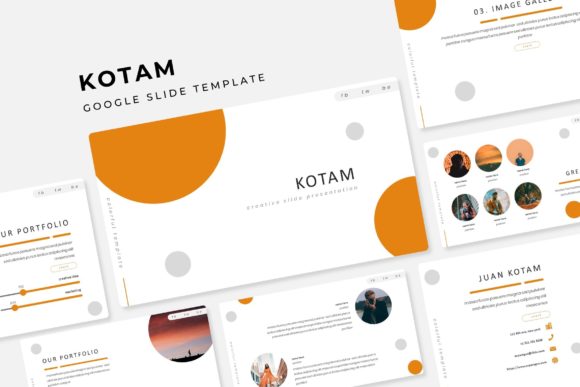
Unlock Creativity with Kotam Google Slide Template
Kotam Google Slide Template is a versatile and meticulously designed presentation tool that offers 150 total slides, each crafted to help you deliver impactful and visually appealing presentations. Whether you're a designer, marketer, or educator, this template provides the flexibility and creativity you need to make your content stand out.
Key Features of Kotam Google Slide Template
- 150 Total Slides: A comprehensive set of 150 slides, providing ample space for all your presentation needs.
- 5 Premade Colors: Choose from 5 distinct color variations, each with 30 unique slides, to match your brand or personal style.
- Handcrafted Infographics: Professionally designed infographics to help you present data and information in an engaging way.
- Section Break Slides: Clear and organized section breaks to keep your presentation structured and easy to follow.
- Gallery and Portfolio Slides: Showcase your work, projects, or products with beautifully designed gallery and portfolio layouts.
- Resizable and Editable Graphics: Fully editable and resizable graphic elements, allowing you to customize every aspect of your slides.
- Drag and Drop Picture Placeholder: Easily add and position images with intuitive drag-and-drop functionality.
- Based on Master Slides: Consistent and professional design across all slides, ensuring a polished look throughout your presentation.
- Pixel-Perfect Illustrations: High-quality, detailed illustrations that enhance the visual appeal of your slides.
What's Included in the Kotam Template Package
- 5 PPTX Files: Five different PowerPoint files, each with its own unique color scheme.
- 5 PPTX Widescreen: Widescreen versions of the templates for a modern and expansive view.
- Readme First Document: A detailed guide to help you get started and make the most of the template.
- Free Font Download Link: Access to the free fonts used in the template, ensuring consistency in your design.
Note: All photographs or pictures used in the preview are not included; they are intended for illustration purposes only.
Creative Possibilities with Kotam Google Slide Template
The Kotam Google Slide Template is not just a set of slides; it's a canvas for your creative expression. Here are some ways you can leverage this template to create outstanding presentations:
For Designers and Creators
Designers can use the detailed infographics and manual editing features to craft visually stunning presentations. The handcrafted infographics are perfect for showcasing complex data in a clear and engaging manner. Additionally, the editable graphics allow for customization, ensuring that each slide aligns with your unique design vision.
For Marketers and Business Owners
Marketers and business owners can benefit from the gallery and portfolio slides to highlight their products, services, or case studies. The section break slides help in organizing the content, making it easier for the audience to follow along. The drag and drop picture placeholders make it simple to add and position images, enhancing the visual storytelling of your presentation.
For Educators and Trainers
Educators can use the detailed infographics to explain complex concepts and the manual editing features to create interactive and engaging educational materials. The section break slides help in dividing the content into manageable sections, making it easier for students to understand and retain information.
Tips for Effective Use of Kotam Google Slide Template
- Choose the Right Color Scheme: Select a color variation that complements your brand or the theme of your presentation. The 5 premade colors offer a range of options to suit different preferences and contexts.
- Customize Infographics: Tailor the infographics to your specific data and information. This ensures that the visuals are relevant and impactful.
- Use Section Breaks Wisely: Utilize the section break slides to create a clear and logical flow in your presentation. This helps in maintaining the audience's attention and understanding.
- Showcase Your Work: Make the most of the gallery and portfolio slides to present your best work. High-quality images and well-organized layouts can significantly enhance the impact of your presentation.
- Keep It Consistent: Use the master slides to maintain a consistent and professional look throughout your presentation. Consistency in design helps in building a cohesive and polished final product.
By following these tips and leveraging the features of the Kotam Google Slide Template, you can create presentations that are not only visually appealing but also effective in achieving your communication goals.
Inspiration and Practical Guidance
Whether you're creating a marketing pitch, an educational module, or a creative portfolio, the Kotam Google Slide Template offers the tools and flexibility to bring your ideas to life. With its high-quality design, customizable elements, and user-friendly features, this template is a valuable asset for anyone looking to make a lasting impression.
Embrace the creative possibilities and practical benefits of the Kotam Google Slide Template. Start crafting your next presentation with confidence and creativity, knowing that you have a powerful and versatile tool at your disposal.